
Discoup is a Kinguin official partner for coupon codes. If you purchase through our links, Discoup may receive a commission.
10 available discounts
-
Kinguin coupon code: 5% off software & ingame
DetailsExpires on 10/31/2026Get 5% discount on games, software & ingame! Ends 10/31
-
Kinguin coupon: 5% off your first order
DetailsExpires on 11/15/2026Join now Kinguin newsletter and you will receive 5% off!
-
Enjoy Kinguin deals: up to 50% off
DetailsExpires on 02/21/2027Take advantage of the Kinguin deals and get up to 50% off!
-
Kinguin savings: up to 60% off Monster Hunter Wilds
DetailsExpires on 02/01/2027Don't miss this chance and save up to 60% on Monster Hunter Wilds!
-
Discover Kinguin offers: up to 90% off Action Games
DetailsExpires on 11/04/2026Discover the best Action Games at Kinguin and get up to 90% off!
-
Kinguin Black Friday deals: Compare digital games by edition and region
DetailsExpires on 11/27/2026Kinguin Black Friday deals may offer digital games and content through individual marketplace listings. Compare platform, edition, activation region and seller details, distinguishing base games from expansions or other products. Check required games and included extras before choosing. Review redemption instructions, restrictions, promotion eligibility and the final checkout amount rather than assuming every listing or seller shares the same terms.
-
Up to 70% off Kinguin promos on VR Games
DetailsExpires on 12/10/2026Buy VR Games at Kinguin and get up to 70% off!
-
Kinguin offer: get up to 90% off Simulation Games
DetailsExpires on 12/20/2026Buy Simulation Games at Kinguin and get up to 90% off!
-
Up to 90% off Kinguin deals on PS5 Games
DetailsExpires on 12/20/2026Buy now the best PS5 games at Kinguin and save up to 90% at checkout!
-
Up to 75% Kinguin discounts on Horror Games
DetailsExpires on 02/03/2027Buy the best Horror Games at Kinguin and get up to 75% off!
Collect points with Discoup Rewards and turn them into Gift Cards
Points Earning and Usage Policy
- Points earned on your online purchases will be visible in your Points Balance within 1-4 days from the date of purchase and will remain “locked” until they are released.
- Points will become available and usable 7 days after the purchase date.
- For purchases made on Travel sites (for example, flights, hotels, and car rentals) and Services sites (for example, insurance, energy, and finance), Points will be unlocked only after confirmation of the actual use of the booking or purchased service.
- Any extra earning plans will be added to your Points Balance according to the specific conditions of the relevant initiative.
- Points cannot be accrued on purchases paid, in whole or in part, with gift cards.
- Points will not be earned when using discount or promo codes that are not provided by Discoup.
- Points are calculated on the net purchase amount, excluding taxes and additional fees (e.g. shipping).
- To award points, the purchase must generate a confirmed commission. If the commission is not recognized, the points cannot be credited.
- To ensure your Points are correctly credited, log in to Discoup and make sure you have accepted all cookies on both Discoup and our brand partners’ websites before proceeding with your purchase.
- If you purchase directly on the brand’s website without going through Discoup, we will not be able to credit you any Points.
Kinguin discounts you may have missed out on
Here are some coupon codes that could still work, and you can get an idea about past Kinguin offers and the frequency of their publication.
Kinguin discount code: get 5% off
Get 5% discount on In-Game items with this code! Valid on $150+ orders.
EXCLUSIVE Kinguin discount code: 5% OFF
Use our exclusive 5% code on all Games and Software products. The maximum cart value for this offer is $173. The usage limit is set to 2 redemptions per user/IP. Expires 9/30
Kinguin discount code: 6% off
Buy of games, Ingame items, prepaids, CSGO skins and software at Kinguin and apply this code to get 6% off! Valid till 3/8.
Kinguin discount code: 6% off for Valentine's day
Buy games, software & ingame at Kinguin and apply code to get 6% off! Minimum basket value $150. Ends 2/16.
Why should you trust Discoup? Real discount codes, manually tested by our team
Each Kinguin discount code you find here has already been tested manually by our team in order to give you only working deals, with no surprises. We verify and update our coupons regularly, only choosing trustable shops and real promotions. Saving money online is easy, safe and always free with Discoup. Find out more about how reliable we are.
Shops similar to Kinguin to save on the category Videogames and Toys
Show more


Discounts Available Today
| Codes: | 2 |
| Offers: | 8 |
| Total Promotions: | 10 |
| Best Discount: | 5% |
Top Shops
List of the best active Kinguin coupon codes
Partially obscured codes (some are exclusive or customized): to view and copy the full code, click on "Get code"
| Code | Offer | Expiration | Get code |
|---|---|---|---|
| SPO*** | Kinguin coupon code: 5% off software & ingame | 10/31/2026 | Get code |
| Already Applied | Kinguin coupon: 5% off your first order | 11/15/2026 | Get code |
| Already Applied | Enjoy Kinguin deals: up to 50% off | 02/21/2027 | Get sale |
| Already Applied | Kinguin savings: up to 60% off Monster Hunter Wilds | 02/01/2027 | Get sale |
| Already Applied | Discover Kinguin offers: up to 90% off Action Games | 11/04/2026 | Get sale |
| Already Applied | Kinguin Black Friday deals: Compare digital games by edition and region | 11/27/2026 | Get sale |
A discount code is the smallest lever Kinguin hands you, and the reason sits in the way this marketplace moves its numbers: the same key is listed by several sellers at once, each free to reprice whenever it suits them, so the figure on a product page can change between one visit and the next with no banner to announce it. Nearly all the money you save at Kinguin is decided by which seller and which regional edition of the key you pick, and only a sliver of it by a code typed at checkout. Knowing that in advance changes where you spend your attention. The cards at the top of this page already hold whatever codes and price-led deals Kinguin has running today. Everything below explains how the marketplace arrives at the number you actually pay, plus the reasons a Kinguin discount code can look entirely sound and still leave the total untouched.
This guide was last reviewed in fall 2026. The live coupons and prices listed above are updated automatically and take precedence over any example described in this guide.
Kinguin's fall pre-orders, region by region, and the weekly drops
Kinguin's pre-order page and US terms, checked in fall 2026. Pre-orders have a page of their own on Kinguin, listed by release date, and the list carried Grand Theft Auto VI as separate console keys for different regions, EU, UK and AU among them, with later launches such as Fable on the same page.
A pre-order is bought and delivered under rules of its own in Kinguin's US terms. It needs a signed-in account and cannot go through guest checkout, and unless the product card says otherwise the key arrives on the day of the official release, in the territory the product is meant for. Release dates belong to the publisher, can differ from one territory to another and can slip, so the regional edition you choose can shape when the key arrives as well as where it activates.
The paid pass adds two things on this front: priority access to upcoming pre-orders, as the pass page lists it, and members-only drops on limited stock, first come, first served, which Kinguin's help center says arrive almost every week.
Terms and closing dates sit on each card at the top of this page, and the deal cards among them work without any code.
Before you pay for a key on Kinguin
Is the offer at the top of a product page the cheapest one? Not necessarily. Kinguin's terms reserve the top of a product card for the offer of a seller who paid for promotion, and the product page labels it "Promoted offer." The other sellers' offers follow from the lowest price to the highest, and sellers tied on price are ranked by Kinguin's rating of each seller's successful transactions.
What is the percentage on a listing measured against? A reference price: the market price of the same product on a platform where it can be redeemed, fixed at an earlier point. The product page names the release date as that point, the terms say it is usually when the product was first published on Kinguin, and both add that Kinguin does not track those prices continuously. A percentage can therefore describe an old price gap, and buyers are asked to check current prices themselves.
Can a pre-order be canceled if plans change? Yes, without giving a reason, at any point before the official release date or the delivery of the key, whichever comes first, under Kinguin's US terms. The amount paid, taxes and the service fee included, goes back to Kinguin Balance, apart from any surcharge for choosing a delivery option other than the cheapest standard one. A refund to the original payment method can be requested from customer support.
Why the seller you pick sets the Kinguin price
Kinguin is not a shop with a warehouse. Its legal notice puts it plainly: the company does not sell the products directly but supplies the machinery that lets buyers and sellers find each other and complete a transaction, payment, delivery and the resolution of disputes between them included. Trading has run on that model since 2013, and it is why a product page here behaves less like a shelf and more like a small auction that never closes.
The practical effect is visible on any listing. One offer comes preselected, with the seller named underneath and the share of their ratings judged superb printed beside it. Below that sits a line telling you how many further offers exist and where their prices start. Kinguin's support pages give the reason those prices differ: sellers obtain stock in different ways, through regional pricing, promotions, bundles and bulk purchasing, and because several of them can list the same product they end up competing on price, rating and delivery quality at once.
Two guardrails sit around that competition. Merchants pass a multi-step verification before they can sell, and a key that does not work is the seller's responsibility, which the legal notice states directly. So the choice in front of you is not a gamble between a real shop and an unknown one. It is a choice between verified sellers whose prices, ratings and delivery records differ, and reading the rating beside the price is what turns a cheap listing into a good one.
Region tags, and what they decide
This is the detail that separates a bargain from a dead key, and it hides in plain sight inside the product title. Where a listing is made for a particular territory, Kinguin marks it in the product title, and its support pages spell the shorthand out: EU covers the European region, NA covers North America including Canada, US is meant only for the United States, and BR, TR, AR, LATAM, ASIA and EMEA each name their own area. ROW, for rest of the world, is usually available almost everywhere but still carries exceptions.
Because the tag is part of the product, the same game exists on Kinguin as several separate listings at several separate prices. The cheapest of them can be the one written for a territory you are not in, and regional pricing is one of the sourcing routes the store names when it explains why its prices are low. Buying across that line does not produce a discount. It produces a region-locked error at activation, which Kinguin describes as a game intended for other regions that cannot be activated in your country.
Two habits are enough to stay clear of it. Read the tag in the title before you compare anything, and then read the country list in the description, because the store warns that a listing marked for one region can still exclude individual countries inside it. The same page also states the platform, the edition and the activation method, and a key bought for the wrong platform runs into the same wall as a key bought for the wrong territory.
Where a Kinguin discount code goes
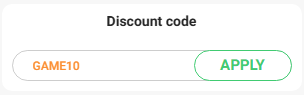
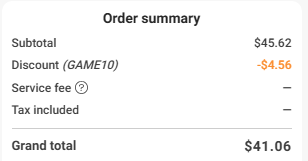
The code is entered once the cart is built, alongside the order summary, in the field reserved for discount codes. Nothing about it appears on the product page itself, so there is no point looking for it while you browse.
- Choose the product, then choose the offer inside it. Platform, edition, activation method, seller and region all belong to the offer you select, not to the game.
- Open the summary and paste the code into the discount field, then apply it and watch the total rather than the message.
- Set your country in the billing details. Kinguin's terms count the billing address among the details used to work out tax, and the billing country, together with your currency and what is in the cart, helps decide which payment methods appear.
- Check the total one last time before paying. Kinguin's totals include tax and a service fee, so the amount you owe is not the raw offer price you were comparing a minute earlier.
Why your Kinguin discount code is refused
A code that Kinguin turns down may still be valid, held back by a condition it was written with, and Kinguin's terms and help pages describe several such conditions.
- It was issued for account holders. Codes do work in guest checkout, but Kinguin reserves the right to issue codes that work only for registered users, announced case by case. Signing in first is the cheapest test there is.
- The payment method is fighting it. Which methods appear at all depends on things like your billing country, your currency and what sits in the cart, and Kinguin's own guidance on paying an entire order from store balance is to route a discounted order through a fee-free method instead. If the code will not settle, changing how you pay is worth trying before you give up on it.
- The cart is the wrong shape. Kinguin's campaign terms describe codes tied to a minimum or a maximum cart value, so the same code can fail on one cart and work on another. Sellers can also set a minimum order value on in-game currencies such as coins or points, and below it the item cannot be bought at all.
- It does not cover what you are buying. A code can be written for particular products or for particular sellers, and on a marketplace a single cart can easily hold items from more than one of them.
- It is spent or out of season. Codes run for a set period, and some limit how many times one user can redeem them. The card that gave you the code shows its end date.
One more possibility deserves its own mention because it looks like a fault and is not one. If a subscription discount is already reducing the item, nothing else will attach to it: the pass discount cannot be combined with other promotions or offers, and Kinguin's US terms say that a member who wants to use another code has to switch the pass discount off at checkout by unchecking it.
What the paid pass actually discounts
Kinguin sells a subscription of its own, and it works as a paid membership. The discount it carries is applied automatically to eligible products while the subscription is live, up to five different products per subscription month and one unit of each, a limit that promotions can raise according to the pass page. The discount is shown on the product page next to the standard price with the difference written out, so you can see what it is worth on the exact item before you pay for a month of it.
Alongside the discount the store lists a monthly gift that has to be claimed by hand from the subscription page, which the pass page describes as a game or a private server of your own, and when it is a key, the game it unlocks can change from one month to the next. The other perks are priority handling on support tickets, priority on pre-orders, a members-only selection of deals and the weekly drops. Billing runs on PayPal or a credit card, every thirty days on the monthly plan and once per term on the longer plans the pass page lists. There is no minimum commitment, and canceling leaves the benefits in place until the end of the period already paid for.
Three limits matter before you sign up. The subscription discount cannot be combined with other promotions or offers, so it is an alternative to a code and never an addition. It cannot be bought through guest checkout, because the benefit has to attach to an account. And for now it cannot share an order with a product, so the subscription and the game you wanted are two separate purchases on the same evening. Kinguin also notes that faulty-key reports submitted to merchants are not handled by its support team and that their response times depend on each merchant's process, so priority support does not speed those up. Such a case can still be escalated to customer support when needed.
Which route saves most on your order
Because these levers pull against each other rather than together, the useful question is which single lever this particular cart calls for.
| Lever | What it needs from you | Where the saving lands | Stacks with anything else? |
|---|---|---|---|
| Choosing the offer inside the product | Reading the seller, the rating and the rival offers | The item price itself | Yes, it comes before everything else |
| Choosing the regional edition | Matching the region tag to where you will activate | The item price, sometimes heavily | Yes, but a mismatch voids the purchase entirely |
| A discount code | A valid code and a cart that meets its conditions | The order total at checkout | Not with the subscription discount |
| The paid subscription | A recurring fee billed at the start of each plan term | Eligible products, automatically, within a monthly limit | No, it cannot be combined with other promotions or offers |
| Store balance | Funds already sitting in your account | The payment step, by avoiding an extra payment fee | Awkwardly: pairing it with a code needs the right payment method |
| Writing a product review | A registered account | Your next order, not this one | Runs separately from whatever you do today |
Read it from the top down. The first two rows decide most of the money and cost nothing but attention, which is why a shopper who compares sellers and reads the region tag can end up paying less than one who spent the evening hunting for a Kinguin promo code.
Wrong key: returns, resale and refunds
Before you click anything, know this: for a key, the right to withdraw from the purchase ends once you claim the product. The legal notice gives the reason: a revealed key can be used on an outside platform without Kinguin's or the seller's control, and in most cases neither of them can even check whether it has already been redeemed. Kinguin's US terms apply that cut-off to products other than in-game goods.
That gives you two very different situations. If the key is still unrevealed, the first day is the easy one: you return the product from your dashboard and the refund is processed automatically into your store balance. After that first day the same route still exists, but it goes through the support team as a manual refund, and it still depends on the key remaining unseen.
If you have already revealed it, the door is not closed. Provided the key is unused, Kinguin offers to resell it on your behalf, with the support team running the whole process and the money credited back once it sells. For a wrong purchase you have already claimed, the store asks you to open a ticket within fourteen days. And when a key simply fails, the seller is the party responsible for it: you open a report in the Resolution Center from the dashboard or straight from the key in your inventory, and refunds can be requested back to the original payment method rather than into store balance.
Paying less at Kinguin without a code
The store keeps a few standing routes open that never involve typing anything. The most concrete one shows up in the review block of a product page, where Kinguin invites registered users to write a review and claim a five percent discount on their next purchase. It pays the order after this one, which makes it worth doing on the way out rather than on the way in.
The newsletter is the merchant's own declared channel for discount codes and exclusive offers, and the sign-up sits in the footer of every page with an unsubscribe link in each email. Store balance is the quieter one: Kinguin describes it as its in-store currency and says paying from it avoids an additional payment fee, which is a small saving that repeats on every order once you have a balance to spend. The footer of the home page also links a browser extension of Kinguin's own.
One more layer sits on the Discoup side of the purchase. Signed in to Discoup, a shopper who reaches Kinguin through this page can collect Discoup points on qualifying purchases and later swap them for gift cards. The points policy printed on the Discoup rewards card sets the conditions: the purchase has to generate a commission that gets confirmed, any discount or promo code used on the order has to be one Discoup provides, and gift cards used for any part of the payment rule the order out.
Frequently asked questions about Kinguin discount codes
Can I use a Kinguin discount code without an account?
Usually yes. Kinguin confirms that discount codes can be used at guest checkout, while reserving the right to issue special codes available only to registered users. Guest checkout has limits of its own worth knowing: it is capped at a total order value the store states as 250 EUR, it may be unavailable in some regions or for some categories of product, and it can offer a narrower set of payment methods than a signed-in checkout.
Why will my code not apply when I pay from my Kinguin balance?
Store balance and a discount can collide at the payment step. Kinguin's guidance for covering a discounted order entirely from balance is to place it with a payment method that carries no processing fee, one of the cryptocurrency options, so that the total including tax and the service fee is visible before you commit. The balance itself is applied with a slider on the checkout page.
Which payment methods does Kinguin accept?
The store lists global options such as PayPal and Klarna, region-specific methods for particular markets, and cryptocurrency, which follows rules of its own described at checkout. Which of them you actually see depends on several things, among them the country entered in your billing information, the currency you have set and the products sitting in your cart, and guest checkout can narrow the list further. If a method you expected has vanished, those are the first things to check.
Can I buy the subscription and a game in the same order?
Not at the moment. Kinguin keeps the subscription purchase separate from regular product purchases so that it can support recurring billing properly, so for now the pass and the game are two orders. The subscription also cannot be bought through guest checkout, since the benefits have to attach to an account, and on the monthly plan it is charged every thirty days rather than on a calendar month.
How quickly does a key arrive?
Most products are delivered within five minutes of the order being placed. Specialty orders behave differently: for in-game items the processing time is stated on the individual product page before you buy, so the answer for those lives on the listing rather than in a general rule. Pre-orders run on their own clock: unless the product card says otherwise, Kinguin's terms set their delivery for the day of the official release.
The key was revoked after I activated it. Who deals with that?
Start with the platform where you redeemed it and ask whether the key was revoked, then open a report in Kinguin's Resolution Center with unedited screenshots showing both the key and the platform's answer. Responsibility for a key that does not work sits with the seller who listed it, which is why the report goes to them through the Resolution Center, with the option to escalate the case to Kinguin's customer support when needed.
Are cheaper listings for the same game a trap?
Not by themselves, but check what makes them cheaper before you assume it is generosity. The two usual explanations are a different seller with a different sourcing route, which is ordinary marketplace competition, and a different regional edition, which is not a saving at all if you cannot activate it where you live. The title of a regional listing carries the region tag and the description carries the country list, and reading both takes less time than a refund does.