
Discoup is a 1Password official partner for coupon codes. If you purchase through our links, Discoup may receive a commission.
20 available discounts
-
1Password Coupon Save 25% on Your First Year
DetailsExpires on 11/05/2026Unlock 25% savings on your first year with this exclusive 1Password coupon for Families. Available to members only—claim your offer now!
-
1Password offer 50% off first year for new customers
DetailsExpires on 11/07/2026Prices are already reduced. No code required. Start shopping the sale today.
-
Sign Up for Email Savings at 1Password
DetailsExpires on 12/31/2026Subscribe via email to receive the newest deals and discounts from 1Password.
-
1Password Student Savings 50% Back To School
DetailsExpires on 11/05/2026Prices are already reduced for students. Shop now and save with no coupon code required.
-
1Password discount 50% Back to School
DetailsExpires on 11/03/2026Shop now for Back to School savings on 1Password. No coupon required and prices are already reduced.
-
1Password deal 50% Off for Families First Year
DetailsExpires on 10/29/2026Shop now for 1Password and enjoy half off for families during the first year. No code required, prices shown apply.
-
1Password promo 25% off first-year Family plan
DetailsExpires on 10/30/2026Shop now with prices already reduced. No promo code required.
-
1Password savings on Business Plans from $ 7.99 monthly
DetailsExpires on 11/02/2026Shop now with prices clearly displayed. No coupon required for the sale.
-
1Password promo 50% off first year for new customers
DetailsExpires on 11/04/2026Prices are already reduced. No code required. Start shopping the sale today.
-
1Password Promo Starting at $2.99 Monthly
DetailsExpires on 11/07/2026Access all your accounts using one secure password with plans starting at $2.99 per month.
-
1Password promotion offers 10 team seats at $19.95/month
DetailsExpires on 11/08/2026Shop now with prices clearly displayed. No code required for this 1Password promotion.
-
1Password offer: 14-Day Free Trial Available
DetailsExpires on 12/31/2026Sign up now to enjoy a 14-day free trial of 1Password services.
-
Request a Demo with 1Password Deal
DetailsExpires on 12/31/2026Access the platform today by requesting a demo to explore its features.
-
1Password Deal on Gift Cards from $25
DetailsExpires on 12/31/2026Browse and purchase gift cards with prices starting at $25 through the provided link.
-
Secrets Automation Promo by 1Password
DetailsExpires on 12/31/2026Manage your secrets efficiently using advanced automation tools.
-
Get 4.99Password savings on Individual Monthly Plan $4.99
DetailsExpires on 12/31/2026Access the individual monthly password plan from 1Password for only $4.99 by clicking through today.
-
Buy with promo 1Password
DetailsExpires on 12/31/2026Follow the link to complete your purchase with 1Password.
-
1Password promo Business Plan $8.99/mo
DetailsExpires on 12/31/2026Billed annually per user each month.
-
1Password deal: Boost Team Plans from $24.95/mo
DetailsExpires on 12/31/2026Access VIP perks with 10 team members monthly. Save more when signing up annually.
-
1Password promotion: Individual Plan $2.99/mo
DetailsExpires on 12/31/2026Billed annually at $2.99 per month for the Individual Password Plan.
Collect points and redeem Gift Cards with Discoup Rewards
Points Earning and Usage Policy
- Points earned on your online purchases will be visible in your Points Balance within 1-4 days from the date of purchase and will remain “locked” until they are released.
- Points will become available and usable 7 days after the purchase date.
- For purchases made on Travel sites (for example, flights, hotels, and car rentals) and Services sites (for example, insurance, energy, and finance), Points will be unlocked only after confirmation of the actual use of the booking or purchased service.
- Any extra earning plans will be added to your Points Balance according to the specific conditions of the relevant initiative.
- Points cannot be accrued on purchases paid, in whole or in part, with gift cards.
- Points will not be earned when using discount or promo codes that are not provided by Discoup.
- Points are calculated on the net purchase amount, excluding taxes and additional fees (e.g. shipping).
- To award points, the purchase must generate a confirmed commission. If the commission is not recognized, the points cannot be credited.
- To ensure your Points are correctly credited, log in to Discoup and make sure you have accepted all cookies on both Discoup and our brand partners’ websites before proceeding with your purchase.
- If you purchase directly on the brand’s website without going through Discoup, we will not be able to credit you any Points.
Why should you trust Discoup? Real discount codes, manually tested by our team
Each 1Password discount code you find here has already been tested manually by our team in order to give you only working deals, with no surprises. We verify and update our coupons regularly, only choosing trustable shops and real promotions. Saving money online is easy, safe and always free with Discoup. Find out more about how reliable we are.
Shops similar to 1Password to save on the category Business
Show more


Discounts Available Today
| Codes: | 1 |
| Offers: | 19 |
| Total Promotions: | 20 |
| Best Discount: | 25% |
Top Shops
List of the best active 1Password coupon codes
Partially obscured codes (some are exclusive or customized): to view and copy the full code, click on "Get code"
| Code | Offer | Expiration | Get code |
|---|---|---|---|
| SEC*** | 1Password Coupon Save 25% on Your First Year | 11/05/2026 | Get code |
| Already Applied | 1Password offer 50% off first year for new customers | 11/07/2026 | Get sale |
| Already Applied | Sign Up for Email Savings at 1Password | 12/31/2026 | Get sale |
| Already Applied | 1Password Student Savings 50% Back To School | 11/05/2026 | Get sale |
| Already Applied | 1Password discount 50% Back to School | 11/03/2026 | Get sale |
| Already Applied | 1Password deal 50% Off for Families First Year | 10/29/2026 | Get sale |
The lower prices 1Password advertises are not sitting behind a code box. Its pricing page ties them to a first-year promotional rate on annual billing, and the footnote under the plans reserves that rate for new customers, for the first year only. A code field does exist on 1password.com, but 1Password's own support pages describe it as the way a university hands over a membership it has already arranged, which is a different thing from a public discount code.
This guide was last reviewed in September 2026. The live coupons and prices listed above are updated automatically and take precedence over any example described in this guide.
1Password promo codes and offers in September 2026
Checked in September 2026. The lines below describe the offer cards that were live on this page while the text was being written, and those cards remain the reference: they are rewritten by the site, this paragraph is not.
Most of these are already-reduced prices, not a string to paste at the end, and that matches how 1Password sells. The savings sit on the plan and on the first term, so the useful question when you compare two cards is which plan each one covers and whether it is limited to a first subscription.
The card lineup as it stood in September 2026
- From $2.99 a month — entry price on the Individual plan — the card states the monthly rate, billed annually — check the card to see how long that price holds
- 50% off — back-to-school sale price, no code — described on the card as limited and subject to availability — the card carries its own end-of-run date
- 25% off — a reduced price, no field to fill — first year on the Family plan — the card says when this one stops
- 50% off — student pricing already applied, no coupon — the card notes the reduction is on the price shown — the last valid day sits with the card and not with this line
- 50% off — coupon entered during payment — annual subscription, presented for new users — look at the card for the deadline
- 25% off — exclusive coupon — first year of 1Password Families — the card gives the last day it can be used
Where the real terms live. Each row above compresses a card into a single line, so the offers listed above stay the place to read the conditions: the plan, the term the price applies to and the eligibility are written there. 1Password itself narrows the field from its side, since its pricing page limits promotional pricing to new customers on annual billing for the first year. This brand also takes part in Discoup points, so a purchase that tracks earns Discoup points as well, whatever the card itself takes off.
What the promo form is for. The form at 1password.com/promo looks like a coupon box and is documented as something else. 1Password's support article on university memberships uses that exact page and that exact field for a code issued by an institution, with the confirmation link sent to an institution email address, so a code picked up elsewhere has no documented path through it.
What to watch next. If you begin on the free trial, 1Password's billing page says the first invoice arrives within 48 hours after the trial ends, so the date that decides your first charge is fourteen days out from your own sign-up and not anything printed on this page.
Deciding before you subscribe
Monthly or annual, if I want the promotional price? Annual. The pricing page attaches the promotion to annual billing, and the subscription article adds that changing frequency later re-prices you at the rate published on the day you change it.
Can a code sit on top of an already reduced plan price? Nothing on 1Password's pricing or billing pages describes combining two discounts, so treat the card you pick as the whole saving and read the total on the payment screen before you confirm.
Does a gift card behave like a coupon? No. The support page says a redeemed gift card becomes account credit and is spent before any card on file is charged, so it changes what leaves your bank, not the price of the plan.
Where a 1Password discount is applied
The promotional price is the one that asks nothing of you. On the pricing page the reduced monthly figure appears next to the regular one once annual billing is selected, and the footnote under the plans reserves it for new customers, for the first year. For that price nothing is typed in and nothing is applied at the end, which is why a shopper who goes looking for a field to fill can conclude the discount is missing when it has already been counted.
The Company Token field, and who it is for
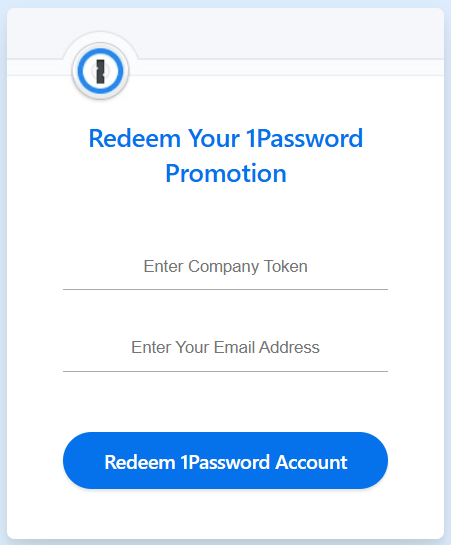
The page at 1password.com/promo carries a short form headed "Redeem Your 1Password Promotion", with a field labeled "Enter Company Token", a second field for an email address and a button reading "Redeem 1Password Account". 1Password's support article on redeeming a student coupon walks through that same page: the code comes from your university, the confirmation link lands in your institution mailbox, and 1Password asks you to finish sign-up with a personal email address so the account survives if the institution address is closed.
Gift card credit
A 1Password gift card is a payment method and not a discount. The support page describes a code of 26 characters beginning with GC, and says the full amount is added to the membership as credit that is used before any credit card on file is charged. During sign-up you choose "Redeem a gift card" when the form asks for a card; inside an account you already have, the same article points to Billing in the sidebar and then "Add a gift card". Two limits are written into that page: a gift card can be redeemed once, and only for an account held on 1Password.com.
Plans, seats and the billing cycle
What you pay is decided by the plan and by the billing cycle, long before anything that looks like a coupon comes into it. On the personal side the pricing page lists Individual for one person and Families, which invites up to five family members, shares unlimited vaults and adds admin controls. On the work side the business page lists the Teams Starter Pack, a flat price covering ten members with the option to add up to ten more at per-member pricing, and Business, billed per user, which also gives every user a free Families plan for personal use.
The billing article puts numbers on the seats: Families includes five family members and five guests, the Teams Starter Pack includes ten team members and five guests, and Business bills for each team member and includes twenty guests. Anyone added beyond that is charged a prorated amount within 48 hours of accepting the invitation, so a family or a team that grows mid-cycle changes the bill without waiting for the renewal.
Which 1Password site holds your account
1Password runs separate account regions and the currency follows the region: the subscription article maps 1Password.com to US dollars, 1Password.ca to Canadian dollars and 1Password.eu to euros, while the pricing page carries the same three-currency switch with a note that data is stored in the region of the currency you choose. That distinction is not cosmetic for anyone chasing a discount, because the gift-card article states that a gift card can be redeemed only for accounts on 1Password.com and not for accounts on 1Password.ca or 1Password.eu. The same subscription article adds a detail that surprises people: 1Password is based in Canada, and some banks apply a small foreign transaction fee to customers outside Canada whatever region the account sits in.
Renewals and people already paying
The footnote under the plans is blunt about who the promotions are for: new 1Password customers only, for the first year, with annual billing. The pricing FAQ repeats it in its own words, saying current promotions are limited to the first year with annual billing. A renewal is therefore the wrong moment to expect the advertised entry price, and no field on the account pages is documented as bringing it back.
One line in the subscription article matters more than it looks, and it points the other way. Changing your billing frequency updates the subscription price to the rate then listed on the pricing page, and an older plan rate cannot be kept once that change is made. If you are sitting on a rate from an earlier price list, moving between monthly and annual will hand it back. The same article does confirm the moves that stay open at any time: changing frequency, changing account type, and starting a subscription again after a freeze.
Subscriptions started inside an app
If the subscription began as an in-app purchase, 1Password hands the billing to the store and several of the routes above close. Its Apple article says a subscription started in the 1Password app on an iPhone or iPad, or in 1Password for Safari on a Mac, is managed with Apple, that the details will not appear on 1Password.com, and that the account type cannot be changed once the subscription has started. The Android article says the same for Google Play and adds a sharper consequence: moving between monthly and annual means canceling with Google and starting a new subscription after the current period ends. On the account type, 1Password's article about changing an account type is less absolute: with an in-app purchase you cannot make that switch yourself, and it asks you to contact 1Password Support. The tax article closes the loop, noting that Apple or Google collect any tax due on those purchases.
Canceling, credit and refunds
The refund policy is short and firm. Cancel during the trial and there is no charge at all. Cancel a paid subscription after a charge and the account stays active to the end of the current billing period, then freezes, and 1Password says no refund is issued for past charges or for time left on the account. Gift card purchases are final and cannot be refunded.
What survives cancellation is more generous than that line suggests. The billing policy page says credit and other perks stay in the account and can be used if you subscribe again, as long as the account is not deleted, though unused credit is not refundable. The frozen-account article fills in the rest: a frozen account still lets you sign in, view every item, copy passwords and copy items to vaults outside the account, while adding items, editing them, inviting people and filling in the browser stop until you reactivate from Billing.
Questions asked before paying
Is there a coupon code field at checkout on 1password.com?
The published help pages document two places where a code is entered, and neither is a checkout coupon box: the Company Token form used for memberships issued by an institution, and a gift card code added from Billing. The promotional price itself is applied by choosing annual billing when you sign up. If the listing above shows a code on a card, follow the steps written there.
Which payment methods does 1Password accept?
The subscription article lists Visa, Mastercard, American Express, Discover, Diners Club, UnionPay and JCB. For an account on 1Password.com it adds two more: a US bank account, described in the pricing FAQ as ACH direct debit for eligible accounts, and a 1Password gift card.
Is sales tax included in the price shown on the site?
No. The tax article says the prices displayed do not include sales tax or value-added tax, because the rate differs by country and region, and that tax is charged on your address whatever currency you pay in. Your own rate appears on the Billing page and as a line on the invoice.
Can a company or a non-profit have the tax removed?
The tax article describes a request process: add the name of your business entity to your invoices and send proof of tax-exempt status. It also lists what counts as proof per country and warns US organizations that federal non-profit status on its own is not accepted for state or city sales tax exemption.
Can I move from Individual to Families later?
Yes, from the account itself. The article on changing your account type sends you to Billing in the sidebar and then to "Switch plan" under Families. The exception is a subscription that began as an in-app purchase, covered in the section on app-store subscriptions above: that switch goes through 1Password Support.
What happens to a family member I remove from the plan?
The billing policy page gives a removed family member 30 days to move their personal items to a new account. The change appears on the invoice after those 30 days have passed, or earlier if the migration is finished before then.